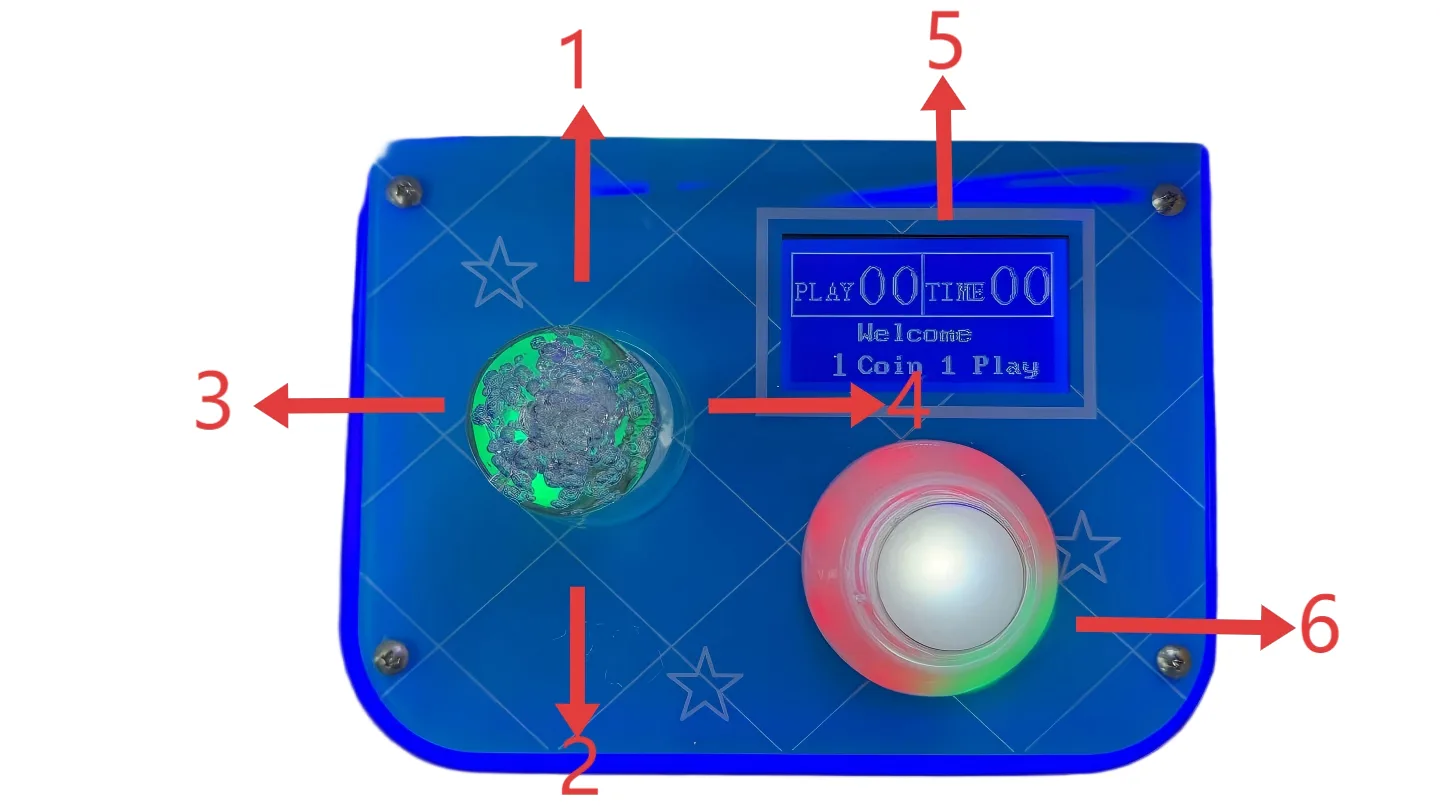
Open the settings menu: press the Menu button (K1) on the control board once. Move the joystick up/down to pick an item, left/right to change its value, and press the Start button to confirm and save.
Open advanced settings: hold the Menu button (K1) for 15 seconds.
Free play (no coins): Basic settings → Free Play Mode → ON.
Coins per game: Basic settings → Coins per Play (1–99).
Claw too weak or too strong: Crane settings → adjust Winning Grip Force, Top Grip Force and Return Weak Grip a little at a time.
How often a strong grab happens: Prize settings → Winning Cycle = a strong grip every N plays.
See how many coins went in: menu item 5, coin & prize counts.
Before you tune anything, write down your current settings so you can go back.
Tuned for home play: easy to win, strong and stable claw, high prize success rate, family and kid friendly, commercial probability control off. The "Board default" columns in the tables below are the control board's own defaults.
Control panel & menu
Joystick up: select setting item
Joystick down: select setting item
Joystick left: change value
Joystick right: change value
LCD menu display
Start button: confirm & save
Main menu
Press the Menu button (K1) once to open it. Some menu names on the screen are literal translations; they're shown in quotes.
No.
Menu
What it does
1
Basic settings ("Infrastructure")
Coins, timer, free play and other game basics
2
Crane settings ("Cable car setup")
Claw grip force and timing
3
Prize settings ("Lottery Settings")
Win mode and how often a strong grab happens
4
Factory test ("Plant setup")
Test the carriage motors, switches, claw and prize sensor
5
Coin & prize counts ("Account inquiry")
See and clear coin and prize counts
6
Lighting
Lights and linking several machines
7
Restore & sharing ("Sharing Settings")
Restore defaults, burn-in test, copy settings between machines
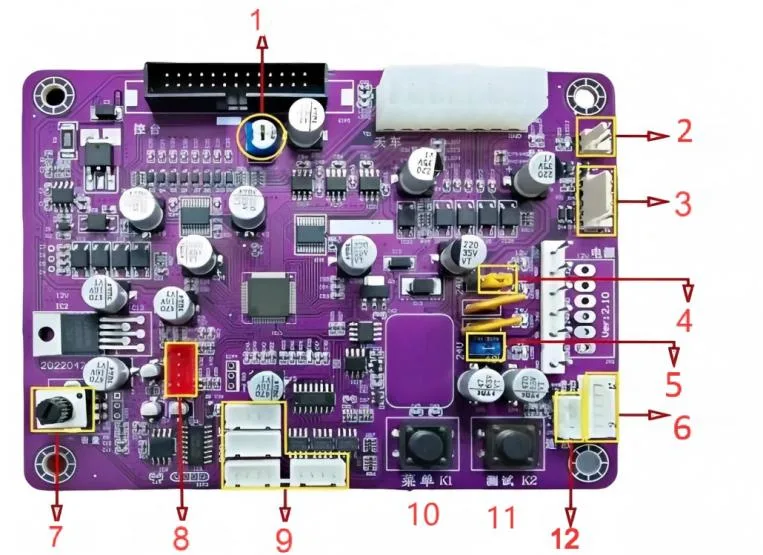
Control board
No.
Part
What it does
1
LCD brightness knob
Adjusts the brightness of the LCD screen
2
Voltage display port
Connects a voltmeter that shows the board's operating voltage
3
Counter port
Connects a counter for coins, plays or games
4
Carriage motor voltage
Adjusts the voltage and speed of the carriage's horizontal movement
5
Claw motor voltage
Adjusts claw motor voltage and grip strength
6
Claw-shake port
Connects an auxiliary claw-shake module, if the cabinet has one
7
Speaker volume knob
Adjusts overall machine volume
8
Program port
Firmware service
9
RGB LED port
Connects the RGB lights for standby and win effects
10
Menu button K1
Opens the settings menu
11
Test button K2
Starts the board self-test / factory test
12
Main wiring harness
Main power plus the carriage, claw, switches and sensors
1 · Basic settings
Setting
Range
Board default
What it does
Coins per Play
1–99
2
Coins needed for one game
Auto Drop Time
5–60 s
15
Claw drops by itself when time runs out
Free Play Mode
ON/OFF
OFF
Play without coins
Photo Eye
ON/OFF
ON
Prize sensor at the prize chute
Prize Outlet Position
Front/Rear
Rear
Where the prize chute is
Air Grab
ON/OFF
ON
Allows grabbing in mid-air
Shake Reset
ON/OFF
ON
Clears credits if the machine is shaken hard
Credit Memory
ON/OFF
OFF
Keeps credits after the power goes off
Bonus Coin
OFF/1–20
OFF
Bonus credit feature
Language
Chinese/English
English
Menu language
Advanced (hold K1 for 15 seconds)
Setting
Range
Board default
What it does
Rope Length
3–99
68
How far the claw drops
Front/Back Speed
10–50
35
Carriage forward/back speed
Left/Right Speed
10–50
35
Carriage left/right speed
Down Speed
10–50
35
Claw lowering speed
Up Speed
10–50
35
Claw lifting speed
Coin Sensitivity
1–60
12
Coin acceptor sensitivity
Background Music
Loop/1–9
Loop
Standby music
Game Music
Loop/1–9
Loop
Music during a game
Background Volume
OFF/1–30
23
Background music volume
2 · Crane (claw) settings
Setting
Range
Board default
What it does
Winning Grip Force
1–50
40
Grip force on a winning play
Bottom Grip Force
1–50
40
Grip force when the claw closes at the bottom
Top Grip Force
0–50
12
Grip force while lifting
Return Weak Grip
0–40
13
Grip force on the way back to the chute
Strong Grip Time
5–30
15
How long the strong grip lasts
Medium Grip Time
1–30
3
How long the medium grip lasts
Weaken at Top
ON/OFF
OFF
Reduce grip force at the top
Advanced (hold K1 for 15 seconds)
Setting
Range
Board default
What it does
Bottom Dwell Time
0–60
1
Time the claw stays at the bottom
Top Dwell Time
1–60
6
Time the claw stays at the top
Top Pull Adjustment
0–20
0
Extra tightening at the top
Drop Delay Time
0–60
0
Delay before the claw drops
3 · Prize settings
Setting
Range
Board default
What it does
Winning Cycle
1–999
10
A strong grip comes once every this many plays
Guaranteed Win Mode
OFF/ON
ON
Guaranteed prize support
Winning Mode
Fixed/Random
Fixed
How wins are spread out
Vending Mode
ON/OFF
ON
Commercial prize control
Guaranteed Attempts
0–99
2
Consecutive guaranteed-win attempts
Reset Timer
0–60
0
Resets the probability timer
Drag Back Probability
0–99
1
Chance the claw lets go on purpose
Release Position
A–E
Random
Where the claw lets go (see below)
Left/Right Drop Point
1–250
45
Left/right release point
Front/Back Drop Point
1–250
45
Front/back release point
Swing Claw Function
ON/OFF
OFF
Lowers grip if the claw swings too much
Prize Type
Plush/Blind Box
Plush
Kind of prize in the machine
Release positions
Mode
The claw lets go…
A
at the bottom
B
in the middle
C
at the top
D
on the way back
E
at the farthest point
4 · Factory test
Test
What it checks
Front/Back Crane
Forward and back movement
Left/Right Crane
Left and right movement
Up/Down Crane
Lifting system
Claw Grip Test
Claw opening and closing
Photo Eye Status
Prize sensor
Run the factory test after changing motor speed or claw force, and after replacing motors, switches, sensors, ropes or the control board.
5 · Coin & prize counts
Item
What it shows
Current coins
Coins taken in this period; can be cleared at the end of the period
Current prizes
Prizes won this period
Clear current counts
Resets the current coin and prize counts
Total coins
Lifetime coins; can't be cleared
Total prizes
Lifetime prizes; can't be cleared
6 · Lighting
Setting
Options
What it does
Online Function
OFF/Host/Client
Controls lighting across linked machines
Number of Machines
4–99
Total linked machines
Standby Color
Pink
LED color while waiting
Win Color
Pink
LED color after a win
Win Flashing
No flashing
Flash pattern after a win
Standby Flashing
No flashing
Flash pattern while waiting
Lights flash rapidly after a win. Linked machines can run synchronized light effects, and standby mode can rotate colors.
7 · Restore & sharing
Setting
What it does
Restore Factory Defaults
Restores the original settings
Burn-in Test Mode
Runs the machine automatically to test it
Basic / Prize / Crane / Lighting Settings Sharing
Copies that group of settings to linked machines
Remote Sync
Cloud parameter sync
Troubleshooting
Problem
Likely cause
What to do
Screen too bright or too dim
LCD brightness doesn't suit the cabinet
Turn the LCD brightness knob on the control board
Coins don't register reliably
Coin acceptor interference or power noise
Raise Coin Sensitivity; check the coin acceptor wiring and power supply
Claw drops too low or too high
Rope length not calibrated
Run the rope length calibration and test again
Claw too strong or too weak
Claw force doesn't match prize weight
Adjust Winning Grip Force, Top Grip Force and Return Weak Grip a little at a time
Prize not detected
Photo eye blocked, dirty, misaligned or off
Clean the prize chute and check Photo Eye Status in the factory test
Unexpected free games
Guaranteed mode or prize settings are on
Check Guaranteed Win Mode, Guaranteed Attempts and Vending Mode
Linked lights out of sync
Online function or machine number wrong
Set one host, give each client a unique number, and confirm the number of machines
Maintenance & safety
Unplug the machine before wiring, replacing parts or working on the control board. Don't adjust voltage controls with wet hands or near exposed live wiring.
Use only compatible power supplies, motors, coin acceptors, photo eyes, counters, speakers and RGB lights.
Clean the prize chute and photo eye regularly. Dust, stickers or prize packaging can trigger false detection.
Check the carriage rails, belts, ropes and claw for wear, and make sure all connectors are seated after moving the machine.
Write down your final settings after tuning.
Stuck? Ask us
Setting up for a party, a game room or a shop? Tell us a little about your machine and your question, and we'll reply by email.